Softaken, a leader in PDF security solutions, is happy to share the newest changes to its main product, Softaken PDF Protector. The new version is for people and businesses who want strong document protection. It adds smarter encryption, more flexible access restrictions, and better usability to keep sensitive PDFs safe.
As more and more businesses share private papers, it is more important than ever to keep PDF files safe from being accessed, copied, or printed by people who shouldn’t be able to. The application solves these problems by giving consumers a simple but powerful way to govern how PDFs are used without making things less convenient.
What’s New in Softaken PDF Protector
Advanced Encryption for Maximum Security
The latest upgrade adds stronger encryption techniques that keep PDFs safe from being viewed or changed by people who shouldn’t be able to. People can now encrypt their data with confidence, knowing that their documents are safe from new online threats.
Access controls that can be changed
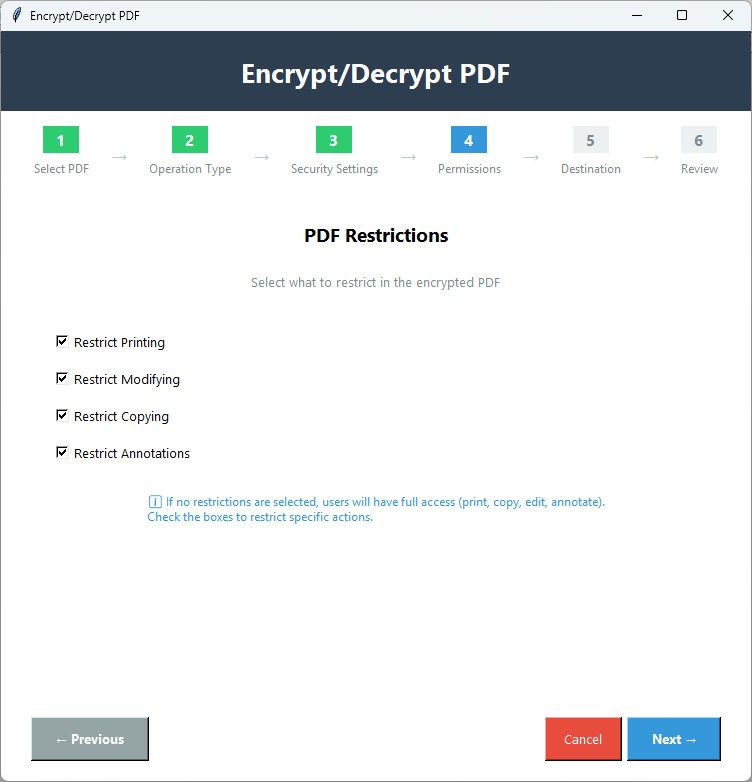
Users can now give each PDF file its own set of access rights. This means that you can’t copy, print, modify, or share. Organisations can give team members special rights, making sure that only authorised people can see sensitive information.
Improvements to the user-friendly interface
The new interface is easy to use, so people of all skill levels can establish security settings in only a few clicks. It is now faster to safeguard PDFs, which means you can spend less time on document management responsibilities.
Batch Processing to Save Time
The software now lets firms safeguard a lot of PDFs at once. Users can apply security settings to more than one file at a time, which speeds up workflows and saves time.
Integration and compatibility
The Software still works with all major PDF formats and runs smoothly on Windows computers. It has flexible capabilities that fit well with existing document workflows, so it’s a good choice for both individuals and businesses.
Why the tool Stands Out
It offers more than just basic PDF security. Many solutions can safeguard your passwords, but Software lets you fully control how people use your documents. People who use it get:
Copy-Proof and Print-Restricted PDFs: Stop someone from copying or printing sensitive information without permission.
Smart Encryption: A high level of protection that changes with the times.
Ease of Use: Users can quickly and easily safeguard PDFs without needing any technical knowledge.
Scalability: Works for one person, a small group, or a big company.